Help Centre › Company directors
Payroll and payslips
6 steps · 2 min · Updated 4 November 2026
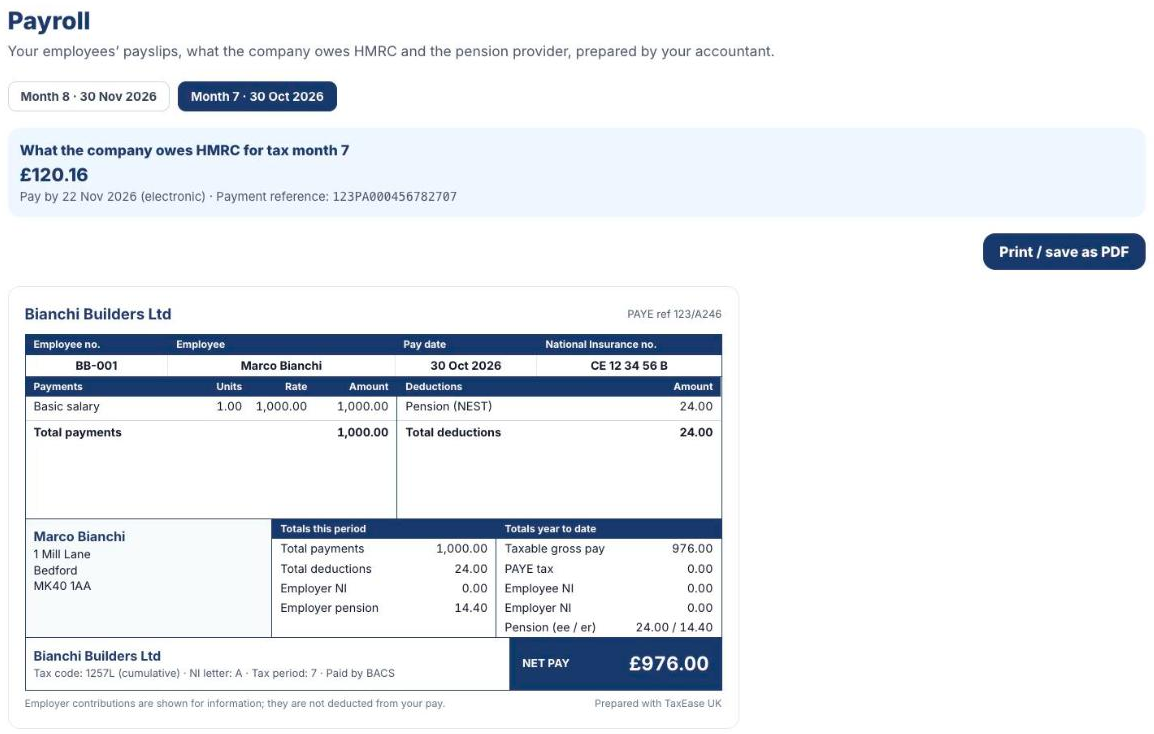
- As the director: under your company books press Open payroll. Your accountant prepares the payroll; you see it here month by month.
- Choose the month at the top. The blue box shows what the company owes HMRC for that tax month, the date to pay by and the payment reference. Below are the payslips of each employee; press Print / save as PDF to keep them.
- As an employee: when payroll starts, each employee gets an invitation email from their employer. They press the link and confirm their date of birth.
- In My payslips they see every payslip (pay date, period, gross, net pay), with View and PDF.
- At the end of the tax year they press Download P60. If they leave, Download P45 appears.
- Under My details they see their address, National Insurance number and tax code, and press Ask for a change if something is wrong.
Was this helpful?Still stuck?or email support@taxeaseuk.com