Help Centre › For accountants
Find and sort your clients
7 steps · 3 min · Updated 3 November 2026
- Press Clients in the menu. The number next to it is how many clients you have.
- Type a name or an email in the search box. To narrow the list, press Filter and pick a status. The active filter shows as a label under the box (for example Not finished); press its × to remove it.
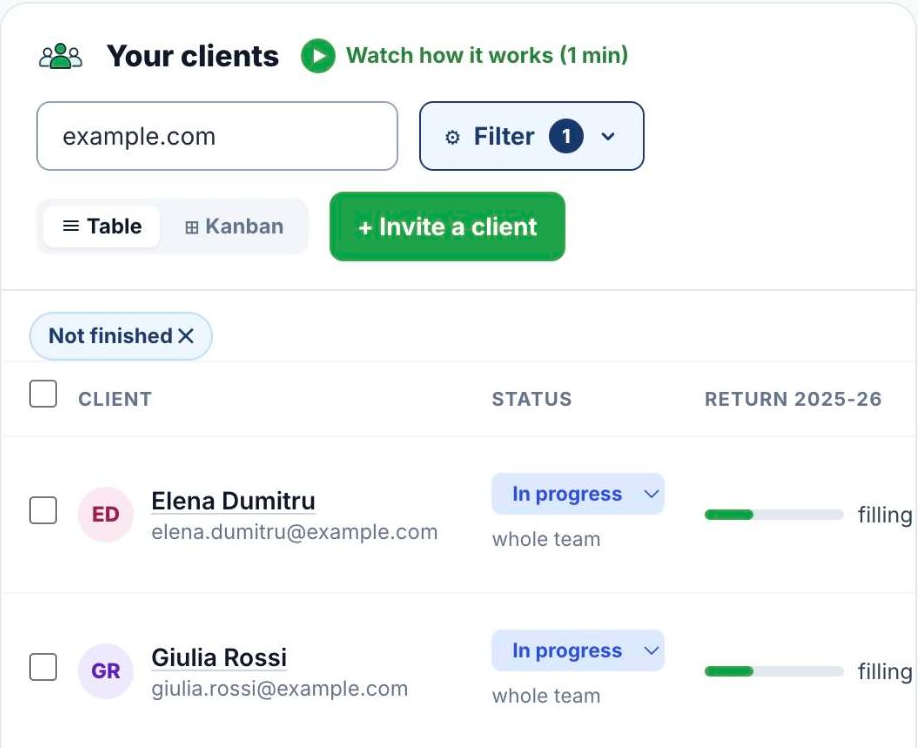
- Press Kanban to see clients as cards in columns by stage, or Table to go back to the list.
- On each row, the Status menu changes the stage of the return (Pending, In progress, Completed, Submitted, Exported). Under it you see who works on the client.
- The buttons at the end of the row: Chat opens the conversation with the client, Notes opens the notes only your team sees, Open SA opens their Self Assessment, and → HMRC lights up when the return is ready to file.
- Tick the boxes on the left to select several clients, then send them a reminder or one message together.
- Click a client's name to open the client file. See The client file.
Good to know
- Labels next to a name tell you more at a glance: Imported (came in with Switch to TaxEase), Unpaid, Included (the client's licence is part of your plan).
Was this helpful?Still stuck?or email support@taxeaseuk.com